An agent describes a task that requires research or interpretation. An automation describes when and how steps are arranged. Keeping those responsibilities separate makes a financial workflow easier to test, reuse and diagnose.
A larger canvas does not automatically create a more capable agent. A more detailed prompt does not automatically create a reliable schedule. Design each part for the responsibility it actually holds.
Give the agent a bounded research task
A useful agent objective might be to summarize a company's latest available results, identify the reporting period and explain the main disclosed changes. Its instructions should define sources, expected output and behavior when evidence is missing.
Test that task independently. Check the instrument identity, source dates, calculations and interpretation. A workflow should not be used to hide an unresolved problem inside the agent it calls.
Give the automation a clear sequence
A workflow can organize a manual or scheduled start, retrieval steps, conditions, agent work and supported outputs. Its connections make the intended sequence visible.
Define what each step receives and produces. If an agent expects a company identifier but a preceding node returns an unstructured paragraph, the integration needs a deliberate mapping or a more precise output format. A visual connection alone does not establish semantic compatibility.
Keep observation, decision and delivery distinct
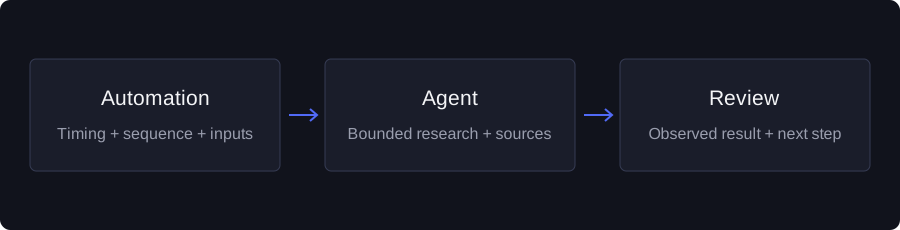
Consider a research routine with three responsibilities: obtain a supported observation, decide whether it warrants a report, and deliver that report to a permitted destination. These steps can fail independently.
A report should not describe delivery as successful merely because the research completed. A missing observation should not be interpreted as a condition being false. Keeping those outcomes separate makes the execution history more informative.
Test the parts, then the full path
First test the agent with an understandable question. Next test the workflow's data and condition steps. Finally test the combined saved version, checking the handoff between each component.
Where an external message is part of the process, select your own connected and permitted destination and deliberately review the delivery behavior. Do not inherit destination identifiers from another person's public configuration.
A useful test record includes the version, input identity, source period, step results and any missing requirements. Those details are more valuable than a single “success” badge when you need to investigate a later result.
Reuse without transferring authority
A shared agent or automation can provide a useful draft. Your copy should be independent and should require your own connections. A creator's configuration cannot give you their data entitlement or authorize access to their private account.
Review copied schedules, assumptions and tool requirements before enabling ongoing work. If you change the agent's objective, revisit the workflow that calls it; the meaning of its output may have changed too.
Start with a first agent and a first automation. Combine them only after you can explain the two individual processes. That keeps complexity tied to a specific need rather than adding it simply because the builder allows another node.
Educational information, not a recommendation to buy or sell an investment. Data availability and product capabilities can change. Examples in this article are illustrative unless identified as observed data.